There is a moment in almost every AV career when a client, a contractor, or even a senior colleague says something like: “The room is big, so let’s get a 98-inch screen.” It sounds reasonable. On its own, it is an incomplete answer, and learning why is one of the fastest ways a newcomer to AV engineering can start thinking like a professional rather than a salesperson.
Screen size is the single most visible number on any display’s spec sheet. It is also the easiest to misuse, because a diagonal measurement in inches tells you almost nothing about whether an audience will actually be able to see, read, and comfortably use that display once it is mounted on a wall. Real engineering evaluation treats a screen size decision as the output of several interlocking parameters, not the starting point.
The trap of single-specification selection
Picture a typical display specification sheet: model number, screen size, aspect ratio, resolution, brightness, contrast ratio, response time, viewing angle, interface, power consumption, weight. Ten or more rows of data, and it is tempting to scan down to “Screen Size,” see “98 inches,” and consider the job done.
The problem is that a 98-inch, 4K display bought purely because “the room needed something big” can still fail the room in practice. It might be mounted too high for a seated audience. It might be viewed from six meters away in a huddle space designed for four people, making slide text unreadable even at 4K resolution. It might sit opposite a floor-to-ceiling window, where 350 nits of brightness get washed out by daylight within the first hour of every meeting. None of these failures show up if the only number you check is screen size. They show up in the room, months after installation, when the client quietly stops using the system.
This is the single-specification trap: real, costly, and completely avoidable.
What engineering evaluation actually weighs
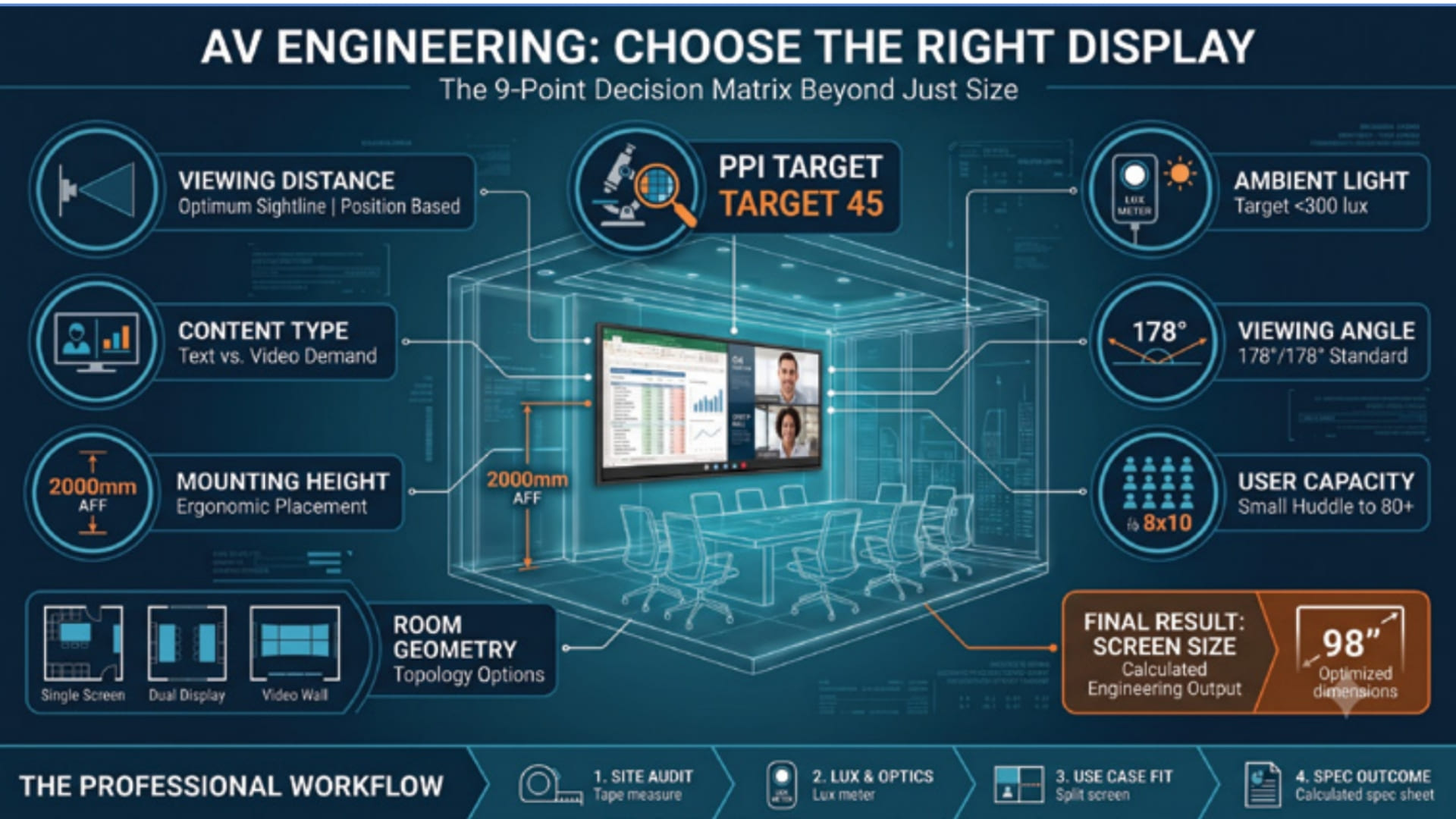
A proper AV display evaluation treats screen size as a conclusion drawn from at least nine interacting factors, not an isolated choice.
Viewing distance sets the outer boundary of the conversation. Most professional displays have a recommended viewing range, commonly between 2.5 and 4.5 meters for a large-format panel. Everything else is checked against it.
Once distance is known, display resolution and pixel density work together. A 4K panel only delivers a genuinely sharp image if the pixel density at the audience’s actual seating distance is high enough; roughly 45 pixels per inch at 3.5 meters is a reasonable rule of thumb. Push the same panel closer or further away, and that sharpness advantage can disappear or become irrelevant.
Ambient light determines whether the brightness and contrast numbers on the spec sheet mean anything in practice. A target of under 300 lux at the screen surface is a common design goal; rooms with uncontrolled daylight need either a brighter panel, better shading, or a smaller, closer-mounted screen so glare matters less.
Content type changes what “readable” even means. A display used mainly for detailed spreadsheets and dense text demands a very different resolution and size calculation than one used mostly for video conferencing faces or simple slide decks.
Viewing angle, expressed as horizontal and vertical degrees (178°/178° is typical for modern panels), determines whether people seated at the edges of a room see a full-brightness, true-color image or a dimmed, color-shifted one.
Mounting height is where good engineering shows up physically. A widely used guideline places the top of the screen around 2000 mm from the floor, centering the image near standing or seated eye level. This detail has nothing to do with the spec sheet and everything to do with the room and the seating layout.
User capacity, how many people the room needs to seat, commonly ranges from a handful to 80 or more in larger spaces. The distance from the farthest viewer to the display directly drives how large the screen needs to be and where it should sit, independent of any number printed on the display’s box.
Room geometry, meaning the shape, depth, and width of the space, determines whether a single large display is even the right solution or whether two smaller displays or a video wall would serve the room’s sightlines better.
Every one of these interacts with the others. Change the ambient light, and the ideal brightness changes. Change the seating capacity, and the ideal screen size and mounting height both shift. That is the core professional insight: display selection is a system-level engineering decision, not a shopping decision.
Why this distinction matters for your career
Understanding this difference is one of the clearest ways to distinguish a technician who installs equipment from an engineer who designs solutions. Clients rarely notice good engineering; a well-matched display simply works, year after year, without complaint. They notice bad engineering immediately: glare complaints, illegible text, sore necks from badly mounted screens, or a system replaced within two years because it never fit the room.
When you can walk a client through viewing distance, ambient light, pixel density, and room geometry as a connected set of design decisions, rather than reciting spec-sheet numbers, you demonstrate exactly the kind of judgment that gets AV professionals promoted from installers to designers, and from designers to consultants. It is also the kind of thinking that protects your reputation: a system specified on sound engineering logic is far easier to defend and far less likely to be blamed when something in the room changes later.
Turning this into a repeatable process
The good news is that none of this requires guesswork. Most manufacturers publish viewing-distance charts and pixel-density calculators alongside their spec sheets so integrators can check a proposed display against real-world room conditions before a purchase order is signed. Lighting can be measured on site with an inexpensive lux meter. Room capacity and geometry are usually already defined in the architectural drawings or the client’s brief. The skill worth building is not memorizing formulas; it is developing the habit of pulling these numbers together into a single evaluation before recommending a product, rather than treating the spec sheet as the whole story.
Some firms formalize this by building a simple checklist or scoring sheet that walks through each parameter for every proposed room, so that no single number, including screen size, is ever the sole basis for a decision. Newcomers to AV engineering can build the same discipline for themselves with nothing more than a notepad and a tape measure, well before any specialized software or tools are available to them.
A practical habit to build now
The next time you are asked to recommend or approve a display, resist the urge to start with size. Instead, start with the room: how far people will sit, how many need to see it, how much daylight enters the space, and what content will actually be shown. Let the screen size, resolution, brightness, and mounting height follow from those answers, rather than the other way around.
It is a small shift in sequence, but it is the difference between selecting a product and engineering a solution. It is also one of the most useful habits a newcomer to professional AV can build early in their career.
This article is for educational purposes. Real-world engineering decisions should always be based on the specific application, site conditions, and project requirements.